UDN
Search public documentation:
AppleiOSProvisioning
日本語訳
中国翻译
한국어
Interested in the Unreal Engine?
Visit the Unreal Technology site.
Looking for jobs and company info?
Check out the Epic games site.
Questions about support via UDN?
Contact the UDN Staff
中国翻译
한국어
Interested in the Unreal Engine?
Visit the Unreal Technology site.
Looking for jobs and company info?
Check out the Epic games site.
Questions about support via UDN?
Contact the UDN Staff
UE3 Home > Mobile Home > iOS Provisioning Overview
iOS Provisioning Overview
Overview
 Note: You must be a registered iOS developer in order to complete the signing and packaging process. You also must have iTunes installed on any machine that will deploy to an iOS device.
Note: There can be multiple Provisions related to one Certificate, but only one Certificate will be valid at a time. Keep this in mind when working with a team of multiple developers; if a certificate is revoked the related provisions must then be modified or new ones created for the new certificate.
Important: Due to changes by Apple, certificates and provisions downloaded after July 2011 require the use of the August 2011 or later iPhonePackager tool.
Note: You must be a registered iOS developer in order to complete the signing and packaging process. You also must have iTunes installed on any machine that will deploy to an iOS device.
Note: There can be multiple Provisions related to one Certificate, but only one Certificate will be valid at a time. Keep this in mind when working with a team of multiple developers; if a certificate is revoked the related provisions must then be modified or new ones created for the new certificate.
Important: Due to changes by Apple, certificates and provisions downloaded after July 2011 require the use of the August 2011 or later iPhonePackager tool.
iPhonePackager Tool / Unreal iOS Configuration Wizard
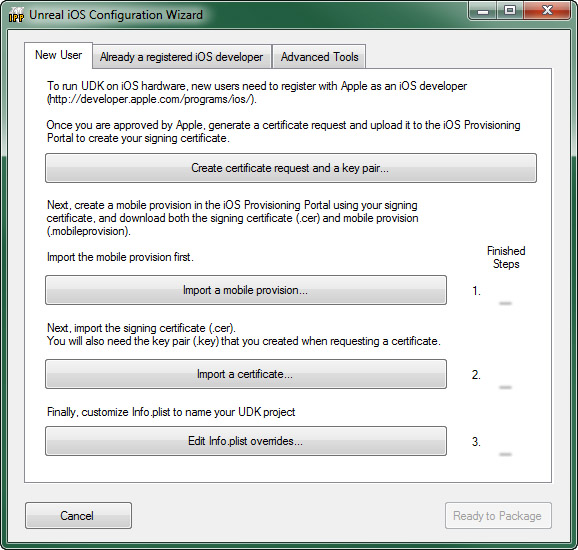 For a reference of the iPhonePackager and Unreal iOS Configuration Wizard, see the iPhonepackager Tool page.
iOS Provisioning Setup
iOS Provisioning Portal
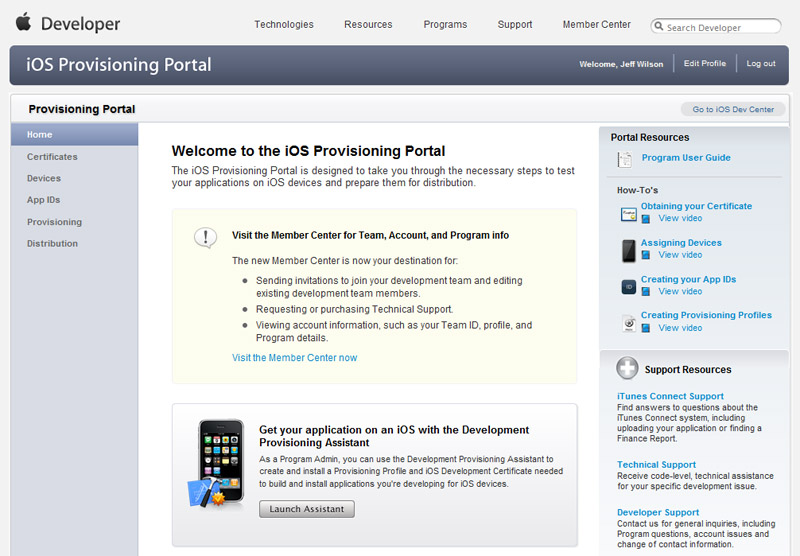 Here, you can add multiple devices, set up explicit bundle identifiers, modify your provisioning profile, and much more. This section will detail some of the common actions that apply to developers creating iOS games with Unreal.
See the iOS Provisioning Portal Overview for details on how to manually set up provisioning.
Here, you can add multiple devices, set up explicit bundle identifiers, modify your provisioning profile, and much more. This section will detail some of the common actions that apply to developers creating iOS games with Unreal.
See the iOS Provisioning Portal Overview for details on how to manually set up provisioning.
Key Terms
- csr - Certificate Signing Request
- Generated by: Keychain or Unreal iOS Configuration Wizard
- Used by : iOS provisioning Portal (Apple.com website)
- Used for: Creating a Signing Certificated
- cer - Certificate (without private key)
- Generated by: iOS provisioning portal (apple.com website)
- Used by: UDK Packaging and Cooking (xcode also uses it when you are setup to use xcode)
- Used for: To code sign an application for iOS (along with a key-pair)
- key - Public / private key pair
- Generated by: Unreal iOS Configuration Wizard
- Used by: iOS when importing a cer
- Used for: To code sign an application for iOS (along with a key-pair)
- p12 - certificate file
- Generated by: Keychain when exporting from OSX or Unreal iOS Configuration after you import a cer + key.
- Used by: iOS Configuration Wizard
- Used for: Transfer a signing identity from one computer to another (e.g. From OSX to PC)
- cer + key: - certificate file and public / private key pair
- Used by: iOS Configuration Wizard
Your key pair and your apple certificate
- Encrypt using a public key: Resulting data can only be decrypted using the paired private key
- Encrypt using a private key: Resulting data can be decrypted by anyone with the public key (usually used for signing - it identifies that the owner of the private key associated with the public key did the signing)
- Your code signing request includes your public key but not your private key
- Apple creates a certificate (signed with their private key) that authorizes you to code sign
- Your private key
- A certificate chain that says you are authorized to code sign (the certificate you download + parent certs we provide)