UDN
Search public documentation:
PerActorParticleCollision
日本語訳
中国翻译
한국어
Interested in the Unreal Engine?
Visit the Unreal Technology site.
Looking for jobs and company info?
Check out the Epic games site.
Questions about support via UDN?
Contact the UDN Staff
中国翻译
한국어
Interested in the Unreal Engine?
Visit the Unreal Technology site.
Looking for jobs and company info?
Check out the Epic games site.
Questions about support via UDN?
Contact the UDN Staff
UE3 Home > Particles & Effects > Particles Systems > Setting up Per Actor Particle Collision Events
UE3 Home > FX Artists > Setting up Per Actor Particle Collision Events
UE3 Home > FX Artists > Setting up Per Actor Particle Collision Events
Setting up Per Actor Particle Collision Events
Overview
Setting up the Particle System
For this example we will use a particle system with collision already setup, and have the system collide with all objects in the scene by default.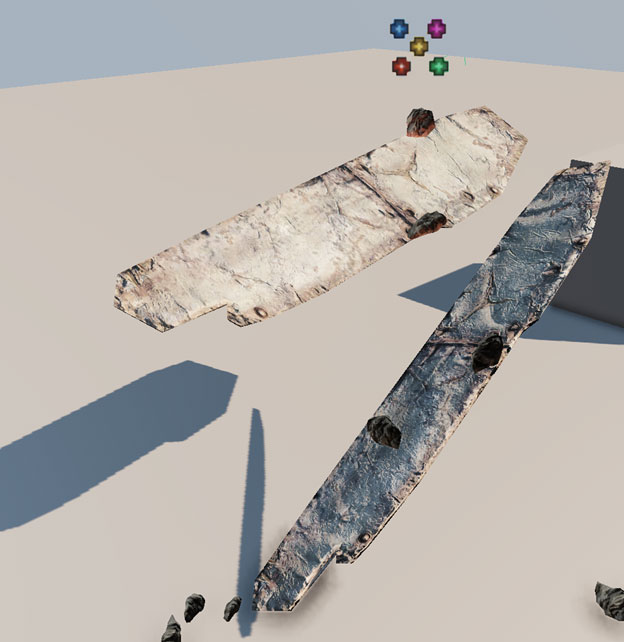 Currently the particles collide with both static meshes and the bsp ground plane using a regular Collision module. By using per Actor collisions we can specify which objects the particle systems (in this case a mesh emitter) will collide with, instead of calculating the entire scene as is the case with the regular Collision module.
If you already have a Collision module in your emitter, disable it and retain the settings for later. Right click and add a new Collision Actor module to your emitter using Collision > Collision Actor.
Currently the particles collide with both static meshes and the bsp ground plane using a regular Collision module. By using per Actor collisions we can specify which objects the particle systems (in this case a mesh emitter) will collide with, instead of calculating the entire scene as is the case with the regular Collision module.
If you already have a Collision module in your emitter, disable it and retain the settings for later. Right click and add a new Collision Actor module to your emitter using Collision > Collision Actor.
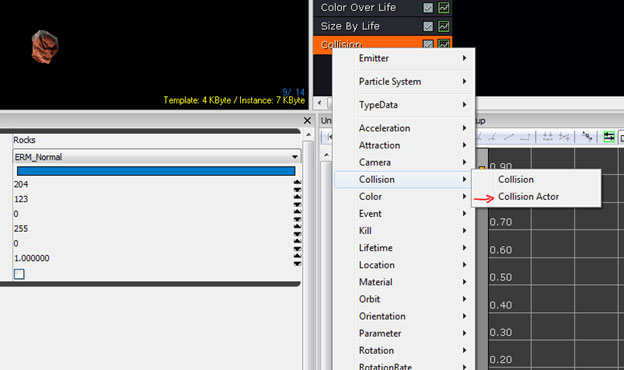 Select the Collision Actor Module and create unique actor parameter names (this is the instance name referenced in the effect placed in the scene) by pressing the Add a New Item button (
  ). Note: you will need a parameter name for each actor you wish to collide with, in this case 2.
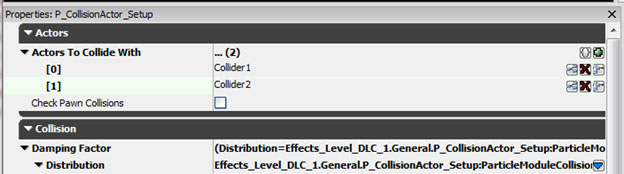
Setting up Instance Parameters
To set up the instance parameters for the effect, select your Emitter Actor in the scene and right click and choose Emitter > Auto Populate.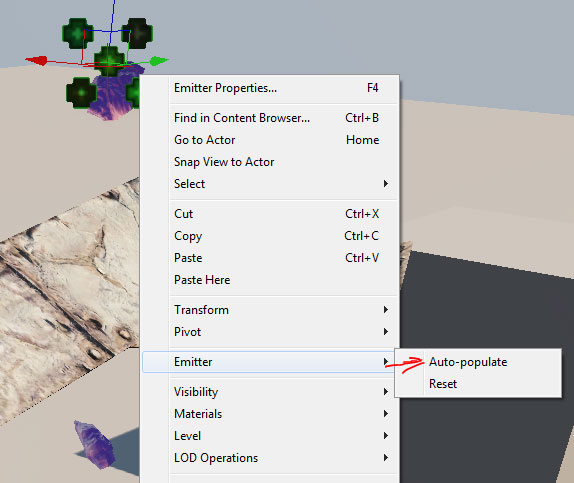 Note: the Instance Parameters of your Emitter Actor will now be bold with 2 new entries [0] and [1] with the Instance Parameter names specified in your effect referenced. Point the Instance Parameter to your actors placed in the scene.
Click the Lock Selected Actors button (
Note: the Instance Parameters of your Emitter Actor will now be bold with 2 new entries [0] and [1] with the Instance Parameter names specified in your effect referenced. Point the Instance Parameter to your actors placed in the scene.
Click the Lock Selected Actors button (  ) in the upper right corner to retain focus on your Emitter Actor, select the first actor you wish to collide with (Collider1) and reference the actor using the Use Selected Object button (
  ). Select your second Actor (Collider 2) and reference using the Use Selected Object button ( ) again.
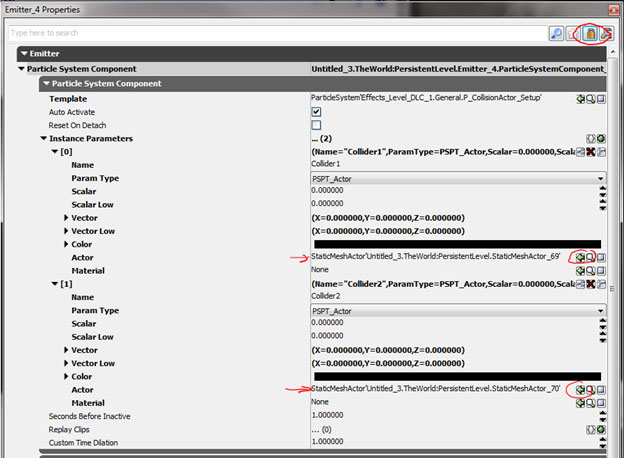 Your particles will now collide with only the actors specified in your scene, falling through any actors not specified. If your particles disappear on collision check your Collision Actor settings and make certain the Collision Completion Option is not set to Kill.
 From this point setup the collision options to define the collision behavior.