UDN
Search public documentation:
MeshSimplificationTool
日本語訳
中国翻译
한국어
Interested in the Unreal Engine?
Visit the Unreal Technology site.
Looking for jobs and company info?
Check out the Epic games site.
Questions about support via UDN?
Contact the UDN Staff
中国翻译
한국어
Interested in the Unreal Engine?
Visit the Unreal Technology site.
Looking for jobs and company info?
Check out the Epic games site.
Questions about support via UDN?
Contact the UDN Staff
UE3 Home > Static Meshes > Mesh Simplification Tool
UE3 Home > Environment Artist > Mesh Simplification Tool
UE3 Home > Environment Artist > Mesh Simplification Tool
Mesh Simplification Tool
How It Works
Summoning the Tool Window
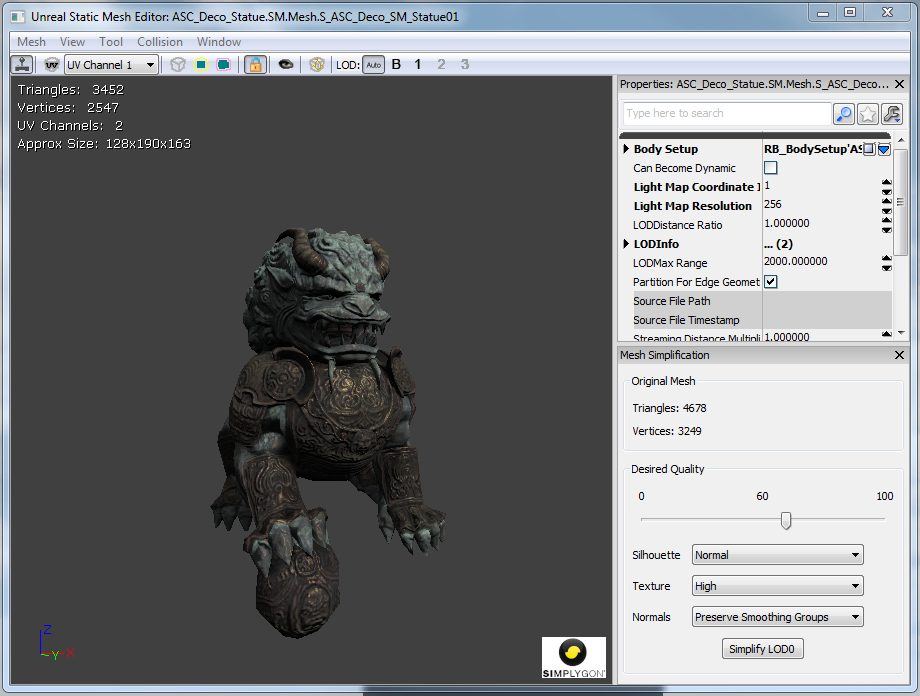 The Mesh Simplification tool is built into the Static Mesh Editor window as a freely dockable tool window.
Simplifying a Mesh
 Select your desired simplification settings and click the Simplify LOD button. The mesh will be immediately updated in both the Static Mesh Editor and other editor viewports.
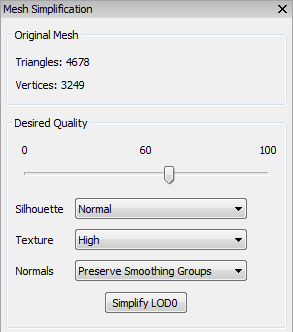 Quality. Unlike past tools you are specifying a quality measure rather than a specific triangle count. The editor uses the desired quality to compute an error metric for the mesh. This error metric prevents the tool from simplifying a mesh such that the surface of the new mesh deviates too much from the surface of the source mesh. The advantage to this approach is that the tool can intelligently optimize the mesh within some deviation of the source mesh without stopping at an arbitrary triangle limit.
Silhouette. You can select how important the silhouette of the mesh is. You can choose from Normal, High, and Highest. Choosing a higher setting will cause the simplification to better preserve the geometric shape of the mesh but will result in a higher triangle count.
Texture. You can select how important texture density is. You can choose from Normal, High, and Highest. Choosing a higher setting will cause the simplification to avoid texture stretching artifacts but will result in a higher triangle count.
Normals. You can select one of four options for generating normals for the simplified mesh:
Quality. Unlike past tools you are specifying a quality measure rather than a specific triangle count. The editor uses the desired quality to compute an error metric for the mesh. This error metric prevents the tool from simplifying a mesh such that the surface of the new mesh deviates too much from the surface of the source mesh. The advantage to this approach is that the tool can intelligently optimize the mesh within some deviation of the source mesh without stopping at an arbitrary triangle limit.
Silhouette. You can select how important the silhouette of the mesh is. You can choose from Normal, High, and Highest. Choosing a higher setting will cause the simplification to better preserve the geometric shape of the mesh but will result in a higher triangle count.
Texture. You can select how important texture density is. You can choose from Normal, High, and Highest. Choosing a higher setting will cause the simplification to avoid texture stretching artifacts but will result in a higher triangle count.
Normals. You can select one of four options for generating normals for the simplified mesh: - Preserve Smoothing Groups: Try to preserve the original mesh's smoothing groups.
- Recompute Normals: Allow Simplygon to recompute normals for the simplified mesh.
- Recompute Normals (Smooth): Allow Simplygon to recompute normals for the simplified mesh, preferring smooth edges.
- Recompute Normals (Hard): Allow Simplygon to recompute normals for the simplified mesh, preferring hard edges.
Generating an LOD
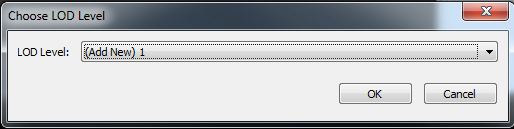 Next you will be asked to select the constraints for generating the LOD:
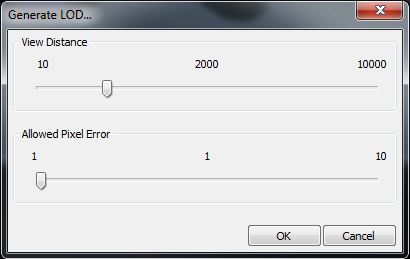 Select the distance at which you wish to swap in this LOD, then select how many pixels the LOD is allowed to deviate from the source mesh. Finally, click OK to generate the LOD.
The editor will compute the quality metric for you when generating an LOD. The allowed pixel error tells the editor how many pixels you're comfortable with the mesh popping at a given distance. As an example, if you set the distance to 2000 and the allowed pixel error at 1, then the generated LOD will not deviate by more than 1 pixel from the source mesh when viewed from 2000 units away. This computed metric is an approximation. It makes some assumptions about the size of the backbuffer (1280x720 is assumed) and the field of view (90 degrees is assumed). This approximation is meant as a starting point from which you can fine tune the quality of the generated LOD.
After generating an LOD you will probably want to tweak its quality. Simply follow the instructions for simplifying a mesh and make sure you select the LOD that you generated.
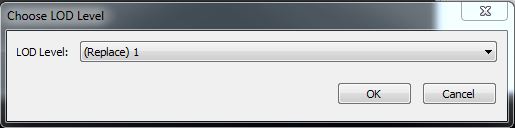
If you would like to regenerate the LOD based on distance and pixel error, you may do so by selecting Generate LOD from the Mesh menu and opting to replace the LOD:
Select the distance at which you wish to swap in this LOD, then select how many pixels the LOD is allowed to deviate from the source mesh. Finally, click OK to generate the LOD.
The editor will compute the quality metric for you when generating an LOD. The allowed pixel error tells the editor how many pixels you're comfortable with the mesh popping at a given distance. As an example, if you set the distance to 2000 and the allowed pixel error at 1, then the generated LOD will not deviate by more than 1 pixel from the source mesh when viewed from 2000 units away. This computed metric is an approximation. It makes some assumptions about the size of the backbuffer (1280x720 is assumed) and the field of view (90 degrees is assumed). This approximation is meant as a starting point from which you can fine tune the quality of the generated LOD.
After generating an LOD you will probably want to tweak its quality. Simply follow the instructions for simplifying a mesh and make sure you select the LOD that you generated.
If you would like to regenerate the LOD based on distance and pixel error, you may do so by selecting Generate LOD from the Mesh menu and opting to replace the LOD:
Simplifying Multiple Meshes
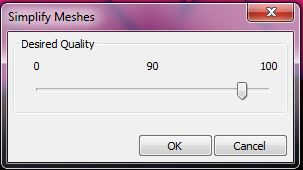 Select a quality level and click OK. All selected static meshes will be simplified. You may wish to tweak the quality level of individual meshes once the batch process has finished.
WARNING: The mesh asset itself is simplified. The change will affect all instances including any that may be closer to the camera. It will also affect instances in other maps.
Select a quality level and click OK. All selected static meshes will be simplified. You may wish to tweak the quality level of individual meshes once the batch process has finished.
WARNING: The mesh asset itself is simplified. The change will affect all instances including any that may be closer to the camera. It will also affect instances in other maps.
Simplygon®
 Simplygon is used to automatically generate game-ready Level of Detail models (LODs) for a specific pixel resolution by removing as much information as possible without degrading LOD quality for a certain onscreen size. Simplygon uses a proprietary mesh reduction method that retains geometrical LOD integrity and visual quality of LOD switching, producing AutoLODs that can directly be used inside triple-A games.
Unreal Engine 3 leverages Simplygon to provide high-quality mesh reduction without having to leave the Unreal Editor. Developers can quickly simplify meshes, generate LODs, and immediately see the results in their maps.
Simplygon is used to automatically generate game-ready Level of Detail models (LODs) for a specific pixel resolution by removing as much information as possible without degrading LOD quality for a certain onscreen size. Simplygon uses a proprietary mesh reduction method that retains geometrical LOD integrity and visual quality of LOD switching, producing AutoLODs that can directly be used inside triple-A games.
Unreal Engine 3 leverages Simplygon to provide high-quality mesh reduction without having to leave the Unreal Editor. Developers can quickly simplify meshes, generate LODs, and immediately see the results in their maps.